

When to keep your current design, adapt a few templates, or rebuild
Yes, you can often add Arabic to an existing website and keep your current design. If your site can publish separate English and Arabic pages, display Arabic correctly from right to left, and support the same enquiry or checkout process in both languages, you may only need to adapt a few parts of the site.
The quickest way to find out is to test one important page and the action that follows it. For a service business, that might be a service page and its enquiry form. For an online store, test a product page, the cart, and checkout. That tells you much more about the work involved than translating the homepage first.
Below is how to decide what your website needs, what to ask your developer to test, and how to publish Arabic pages while protecting the English URLs people already use.
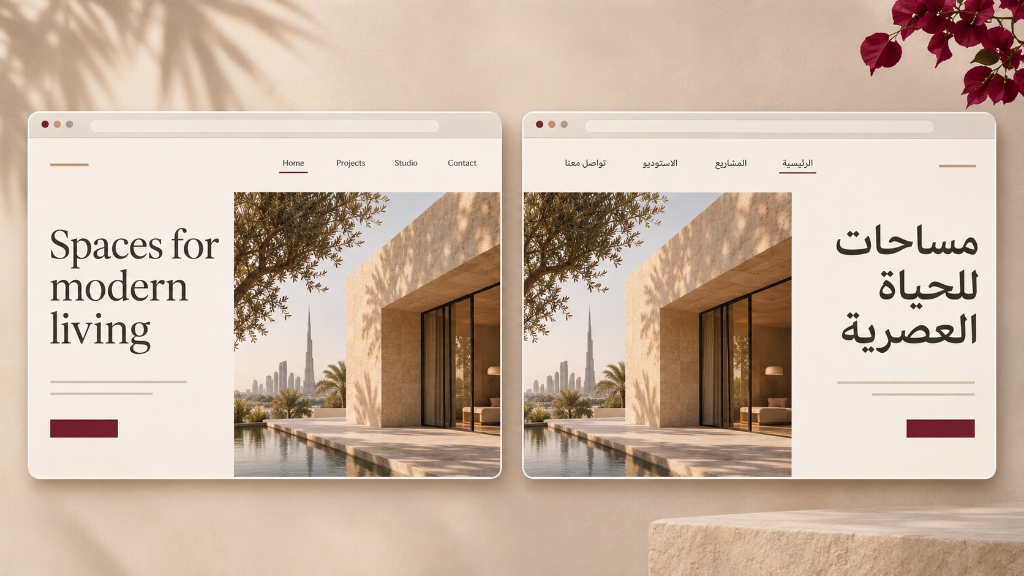
Can you add Arabic without redesigning your website?
You can usually keep your branding, page structure, and most of your visual design if your website is in good shape. The Arabic version may still need a different font, more room for headings, or a menu that opens from the opposite side. These changes can often be made within your current templates.
Use this table to narrow down your options before asking for a quote.
| Option | When it makes sense | What changes |
|---|---|---|
| Keep the current design | Your templates already support Arabic layouts, and your forms or checkout work in both languages. | Arabic copy, language switching, page titles, and smaller adjustments to spacing and typography. |
| Adapt selected templates | The site works well in English, but key elements like the mobile menu, product filters, or forms break in Arabic. | The affected templates or components are adapted. The rest of the site can stay in place. |
| Rebuild what’s holding the site back | The current platform can’t publish separate language pages, an essential integration can’t support Arabic, or maintaining both versions would be unworkable. | A new setup for the affected parts of the website, or a full rebuild if the limitations affect the whole site. |
If the problem is isolated to the navigation or enquiry form, get a quote for those changes first. If the pilot shows that the underlying site is holding back both versions, website redesign and takeover services in Dubai can help you work out what to keep before approving a rebuild.
Request an Arabic Website Assessment
What actually changes on an Arabic website?
Arabic is read from right to left, often shortened to RTL. A suitable layout needs to handle the direction of text, navigation, and forms. It also needs to display Arabic alongside English brand names, email addresses, prices, and product codes without putting them in the wrong order.
Menus, headings, and buttons
Open your Arabic test page on a phone. Check where the menu opens, how headings wrap, and whether the main button still fits. A button that says “Request a quote” in English may need more room in Arabic. An arrow that indicates the next step may need to change direction, while your logo and product photography should keep their original orientation.
Check the Arabic typography in an actual page layout. A heading can look fine on its own and become hard to read when it wraps over a photo or sits beside an icon. Test a long service name and a short one before signing off on the template.
Forms, product filters, and checkout
A visitor who reads your service page in Arabic should be able to complete the next step in Arabic too. For an enquiry form, check the field labels, required-field messages, submit button, and confirmation. Test an Arabic name alongside a phone number and an English email address.
For an online store, select a variant, apply a discount code, check the delivery information, and go as far as the final payment step in a test environment. If a third-party payment screen or booking widget remains in English, identify exactly where that happens. You can then decide whether to explain the handoff or replace that part of the experience.
Start with the pages customers use to make a decision
Think about what an Arabic-speaking customer needs to know before they contact you. That’s the first group of pages to work on.
- A service business might start with the homepage, its most requested service, one relevant project, and the enquiry page.
- An online store might start with a popular category, representative product pages, delivery and returns information, the cart, and checkout.
- A company selling courses or training might start with the programme overview, a course detail page, common questions, and the registration process.
List the elements on those pages that sit outside the main copy. That includes menus, form errors, confirmation messages, product options, and any emails the customer receives. A page can look fully translated in a screenshot while its form still tells the customer what went wrong in English.
Have a fluent Arabic reviewer read the finished pages in context. Ask them to pay special attention to technical terms, button labels, prices, and wording that feels awkward when translated directly. If you’re scoping a project, our bilingual website cost guide for Dubai businesses explains the work that goes into a quote.
How to add Arabic without disturbing your English SEO
Adding a second language gives you a chance to publish pages for an Arabic-speaking audience. Keep the existing English pages that already work, and plan how readers and search engines will find the new versions.
Give each language its own page URL
If your English services page is already at /services/, an Arabic equivalent could live at /ar/services/. That is one possible structure. The important part is that each language version has a stable URL someone can open, share, and revisit.
Google recommends separate URLs for different language versions. It also recommends giving people a link to switch languages and avoiding automatic redirects that prevent them from choosing another version. If a visitor switches to Arabic on a service page, send them to the Arabic version of that service when it exists. Sending them to the Arabic homepage makes them find the service all over again.
Connect matching pages and review the Arabic copy for search
Ask your developer to connect equivalent Arabic and English URLs with hreflang. It helps Google recognise which pages are language versions of one another. Only pair pages that serve the same purpose. An Arabic contact page is the equivalent of the English contact page. An Arabic homepage is a poor substitute for a service page that hasn’t been translated yet.
Write Arabic page titles and headings based on how your customers describe the service. Start with words they already use in enquiries, calls, or product searches, then check whether those terms fit the page. If you want help planning that work, see our Arabic SEO services in Dubai.
Keep existing English URLs wherever you can
There’s usually no reason to move /services/ to /en/services/ just to make the structure look symmetrical. Keep a record of the English pages that already bring in clicks or enquiries. If a rebuild requires a URL to change, map the old page to its closest replacement and set up a permanent redirect. After launch, check that the existing English pages and new Arabic pages open as intended.
Two examples from DOT IT’s bilingual projects
Parts360 Saudi Arabia
Parts360 needed an Arabic and English e-commerce website for automotive parts. The store was built on WordPress and WooCommerce with right-to-left support. It also included Mada payments for the Saudi market. For a store like this, a useful Arabic test follows the full purchase path: find a product, make a selection, check delivery, then proceed to payment. A translated homepage alone would leave most of that journey untested. Read the Parts360 e-commerce case study.
Crypto Financial Academy, Dubai
Crypto Financial Academy needed an Arabic-first website for its financial education programmes. DOT IT built the site on Wix, with structured course pages and responsive layouts. In this type of project, course information is where the design does the most work. A visitor should be able to scan what a programme covers, review the details, and see what to do next on a small screen. Read the Crypto Financial Academy case study.
What to give your developer before asking for a quote
Send your website URL, the first three to five pages you want in Arabic, and the action you want customers to take. Say who will supply and approve the Arabic copy. List any forms, payment providers, booking tools, or other systems that need to work across both languages.
Ask for the quote to show which pages can use your current design, which templates need work, and what the first launch will cover. If a rebuild is proposed, ask to see the limitation on your pilot page. You should be able to tell whether the issue affects one component or the whole website.
Before launch, walk through the experience yourself in both languages.
- Open the Arabic page directly on your phone and switch back to its English equivalent.
- Read a long heading, use the navigation, and check any prices or product codes.
- Submit a test enquiry or complete a test checkout, including any confirmation screen or email.
- Check that the original English pages still open at their usual URLs.
- Review the first Arabic pages in Google Search Console and compare their clicks and impressions separately from the English versions.
Review Your Site for Arabic Support
Frequently asked questions
Do I need to translate the whole website at once?
No. Start with a complete customer journey. An Arabic service page, a relevant example, and a working enquiry form give a visitor enough information to act. You can add other services or resources after that first group is ready.
Can I use automatic translation to get started?
You can use it to prepare a first draft. Have a fluent Arabic speaker review the important pages before they go live. Prioritise anything that affects a buying decision, including descriptions, prices, forms, return terms, and the messages customers see after they submit an enquiry.
Can I add Arabic to WordPress, Wix, or Shopify?
Often, yes—whether you run WordPress, Wix, or Shopify. The answer depends on your specific theme, templates, and apps. Test one representative page and any form or checkout it relies on. That will show whether you can make the change in your current setup and which parts need separate work.
Will adding Arabic hurt my English rankings?
Adding Arabic doesn’t require replacing your English pages. Keep the existing URLs and check that the language setup hasn’t changed which version people or search engines can reach. If a redesign also changes English URLs, handle those changes as a separate part of the launch and monitor the affected pages afterward.
Find out what your current website can keep
If you’re considering an English-Arabic website, send us your current URL and the pages you want to launch first. We can review your design, language options, and enquiry or checkout process, then explain which parts can stay and where Arabic support needs more work. Explore DOT IT’s Arabic website design services in Dubai. If your team is based in the capital, we also offer Arabic and bilingual website design for Abu Dhabi businesses.
